Create your studio
FeaturesVastuStudioPricingFAQSign in
For interior design studios in India

From floor plan to signed quote, in one studio app.

AkrtiBits gives your studio a 2D plan and 3D walk-through, furniture with real material estimates, GST quotes your clients approve on their phone, and Vastu checks with a printable report. Then it runs the projects, people and payments behind them.

Create your studio

Runs in the browser · Client links open on any phone · Plan & 3D, Vastu and GST quotes in every plan

AkrtiBits · Plan & 3D
AutoCAD DXF importAI plan tracingFloors and split viewWalk mode with wall collisionsSun at any hourWalk-through videos up to 4K360° photosOne-click design stylesFurniture from a photo8 × 4 sheet cut plansRoom-wise BOQCGST · SGST · IGSTClient approval linksVersions and change orders16 Vastu zones32 entrance padasPrintable Vastu reportLeads boardPurchase ordersReceivables ageingSnag listsClient portal
Design to delivery

Everything between the first sketch and the final invoice.

One design file feeds the 3D view, the estimate, the quote and the Vastu check, so nothing is typed twice.

01 · 2D plan

Draw it once, to the millimetre.

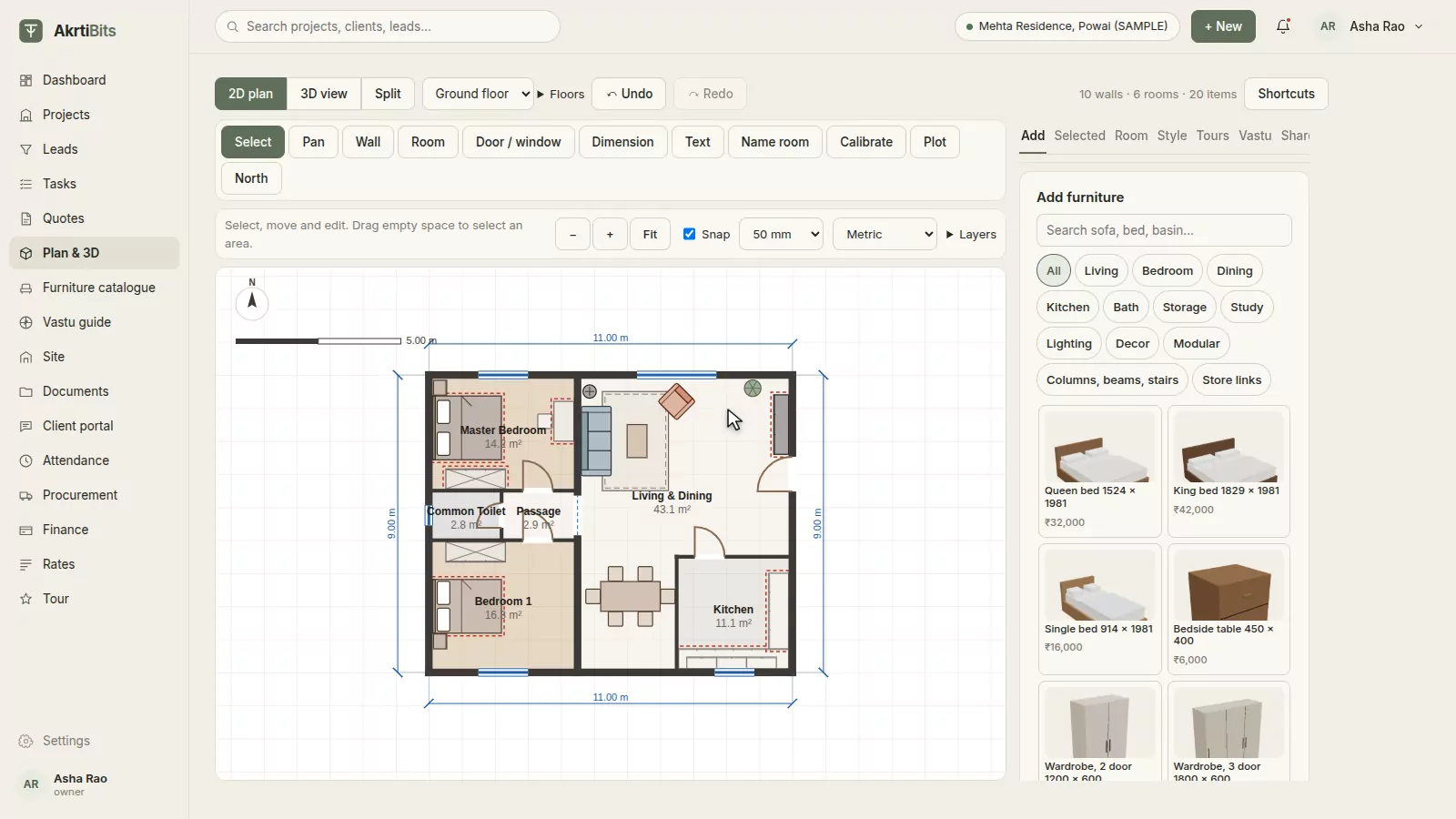
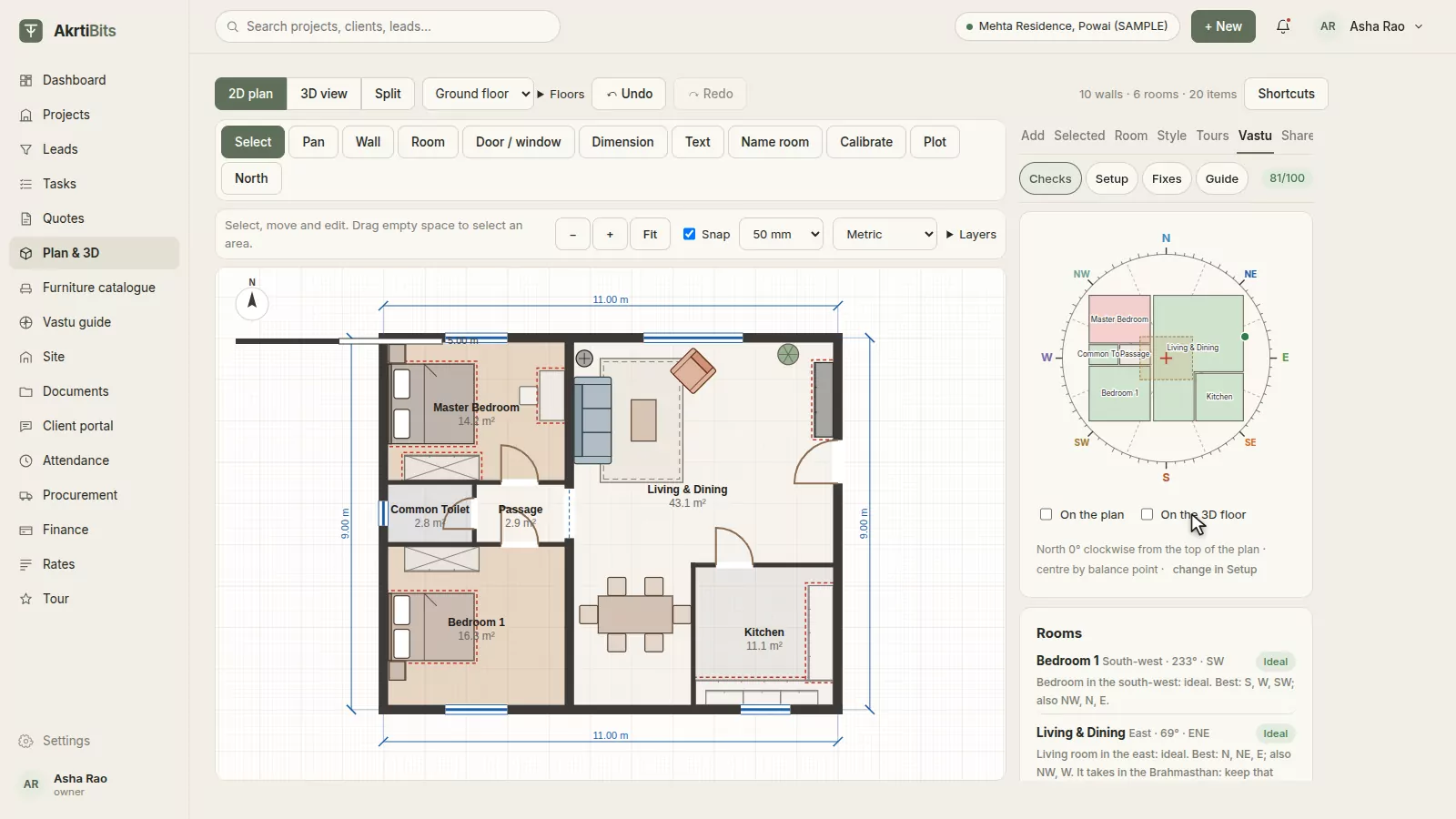
Drag out rooms, chain walls with typed lengths, and drop in doors and windows that snap to the wall. Trace over a photo of the architect's drawing, let AI draft the walls for you, or import the AutoCAD DXF. Add floors and keep the plan and 3D side by side.

  • Walls, rooms, doors and windows
  • DXF import and export
  • AI tracing (beta)
  • A3 PDF with a title block
The 2D plan editor with a furnished two-bedroom flat
02 · 3D walk-through

Walk your client through it.

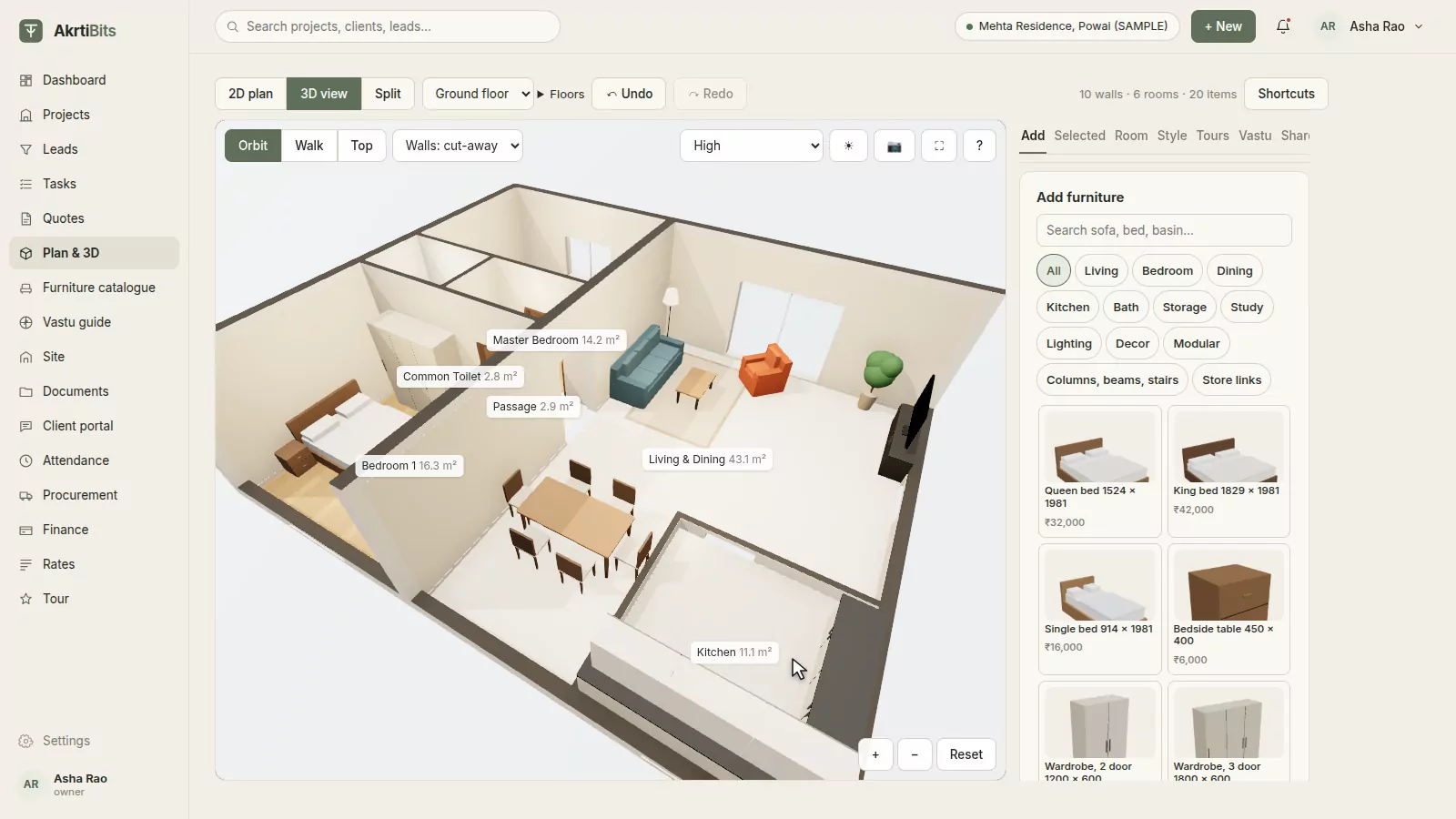
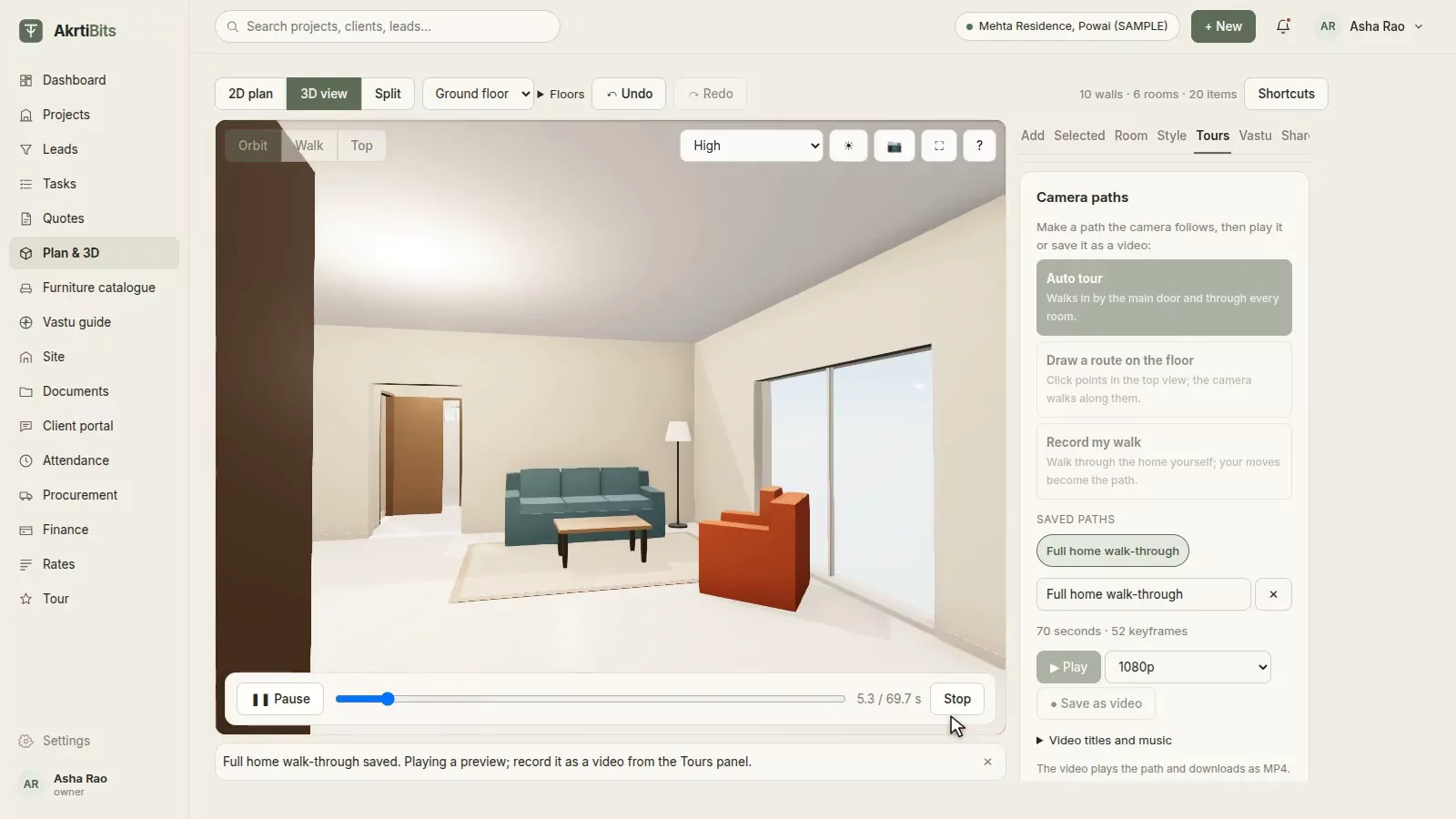
Orbit the whole home, step inside in walk mode with real wall collisions, or look down from the top, with sunlight for any hour of the day. One click records a tour through every room; save it as a video up to 4K, or as a 360° photo, right in the browser.

  • Orbit, walk and top views
  • Auto tour through the doors
  • Video up to 4K
  • 360° photos
The furnished home in 3D, seen from above with the walls cut away
03 · Furniture & styles

Furnish and style it live.

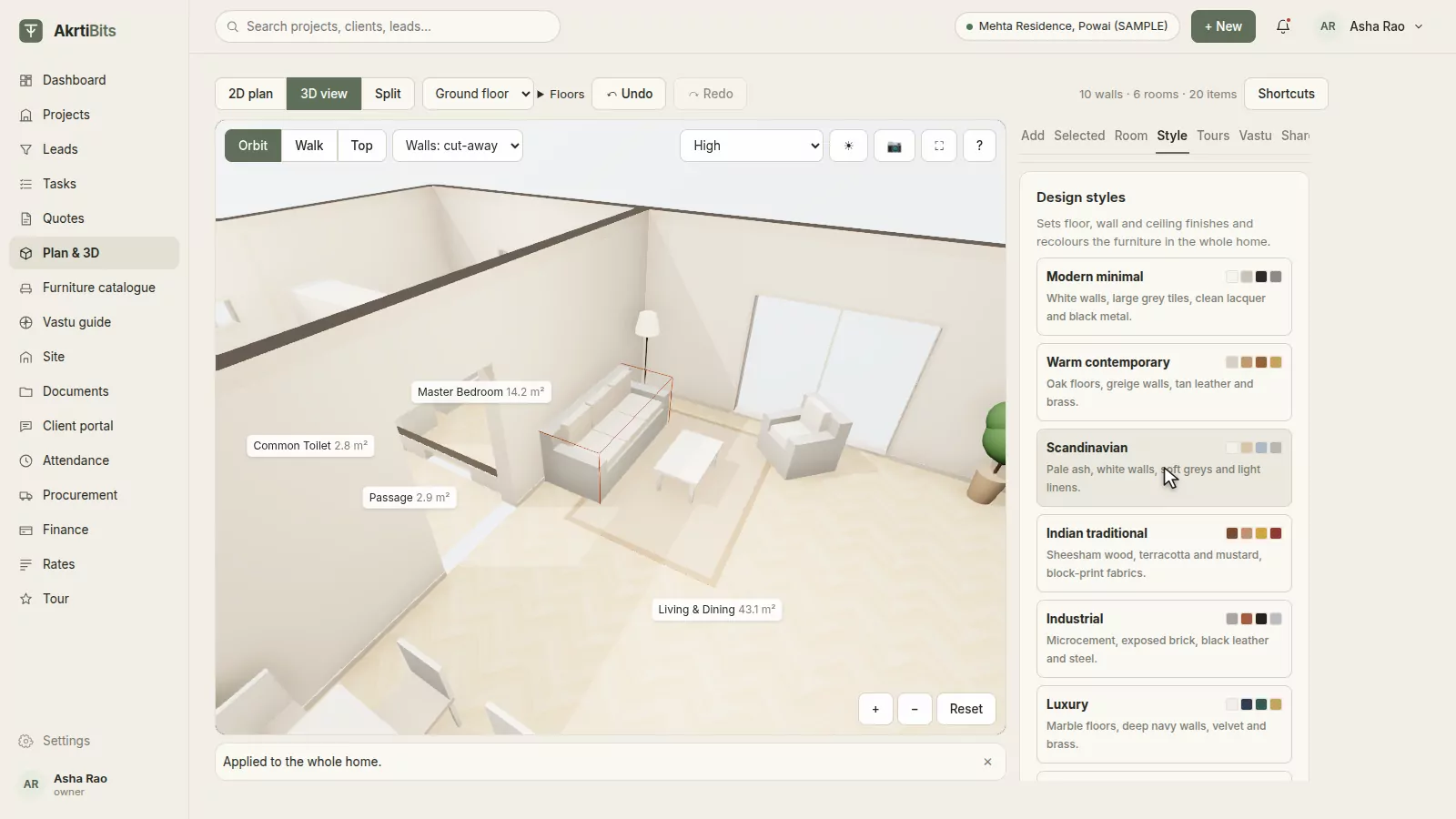
Place parametric furniture and made-to-measure modular units in the plan or in 3D. Change the fabric, wood and colour of any piece, or restyle the whole home in one click: Scandinavian, Indian traditional, warm contemporary and more. Add your studio's own pieces from a photo.

  • 50+ ready pieces and modular units
  • Materials, fabrics and patterns
  • One-click design styles
  • Your own catalogue, from a photo
The living room in 3D after applying the Scandinavian style
04 · Estimates & cut plans

Know what every piece costs to build.

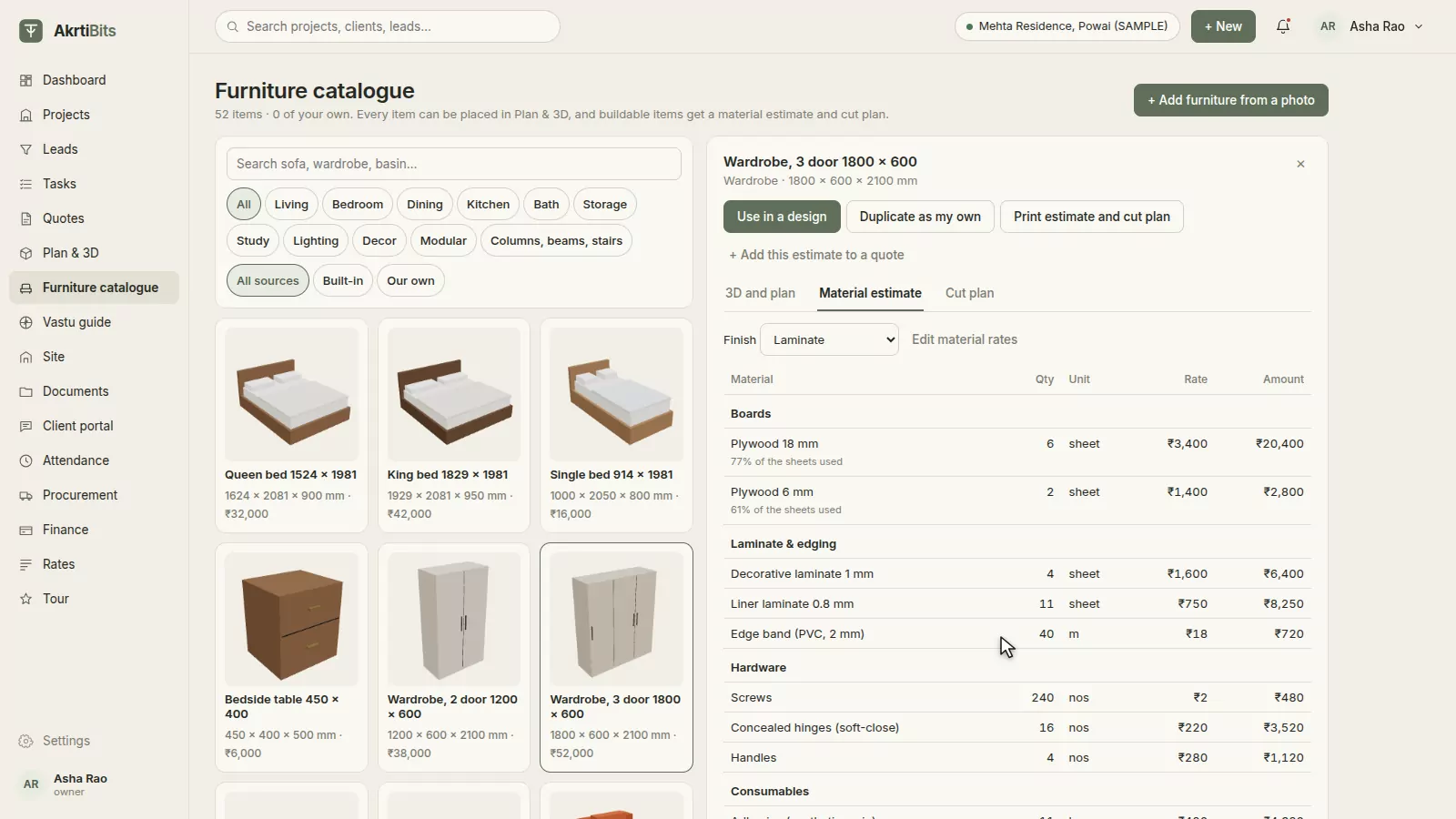
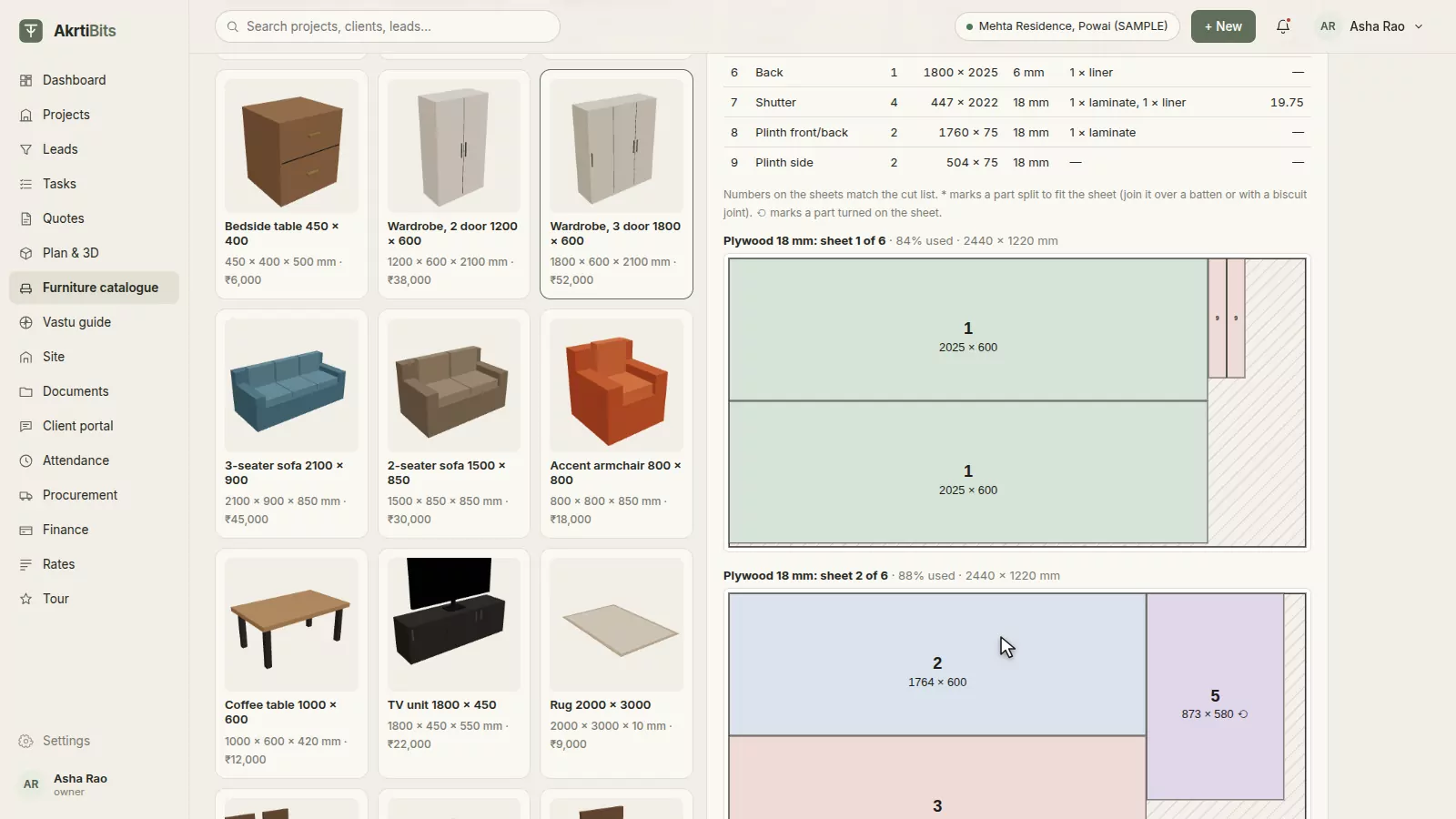
Every buildable piece breaks down into plywood, laminate, edge band, hardware, polish and upholstery using Indian carpentry practice, priced at your own rates. Parts are nested onto 8 × 4 sheets, so you see the cut plan and the waste before the carpenter does.

  • Board, laminate and hardware quantities
  • Nested cut plans on 8 × 4 sheets
  • Your own material rates
  • Add the estimate to a quote
A three-door wardrobe's material estimate
05 · GST quotes

Quotes clients approve on their phone.

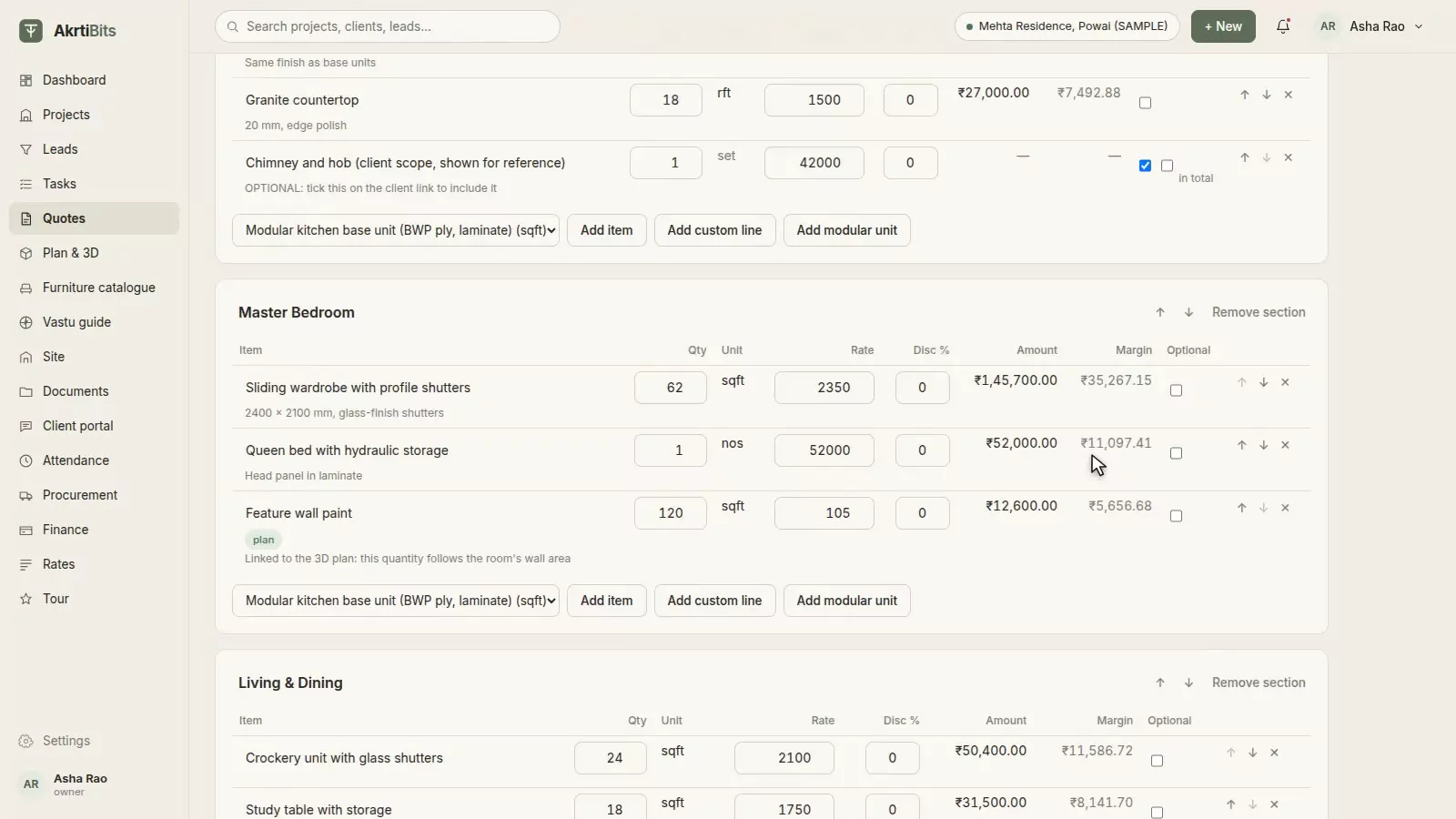
Room-wise lines with CGST and SGST, or IGST, worked out from your state and the site's; flat discounts; optional items the client can tick; and payment milestones. Quantities can follow the plan, and versions and change orders keep the history.

  • GST split by state
  • Client approval link
  • Versions and change orders
  • Cost and margin view
A room-wise quote with quantities, rates and margins
06 · Vastu

Vastu, checked while you design.

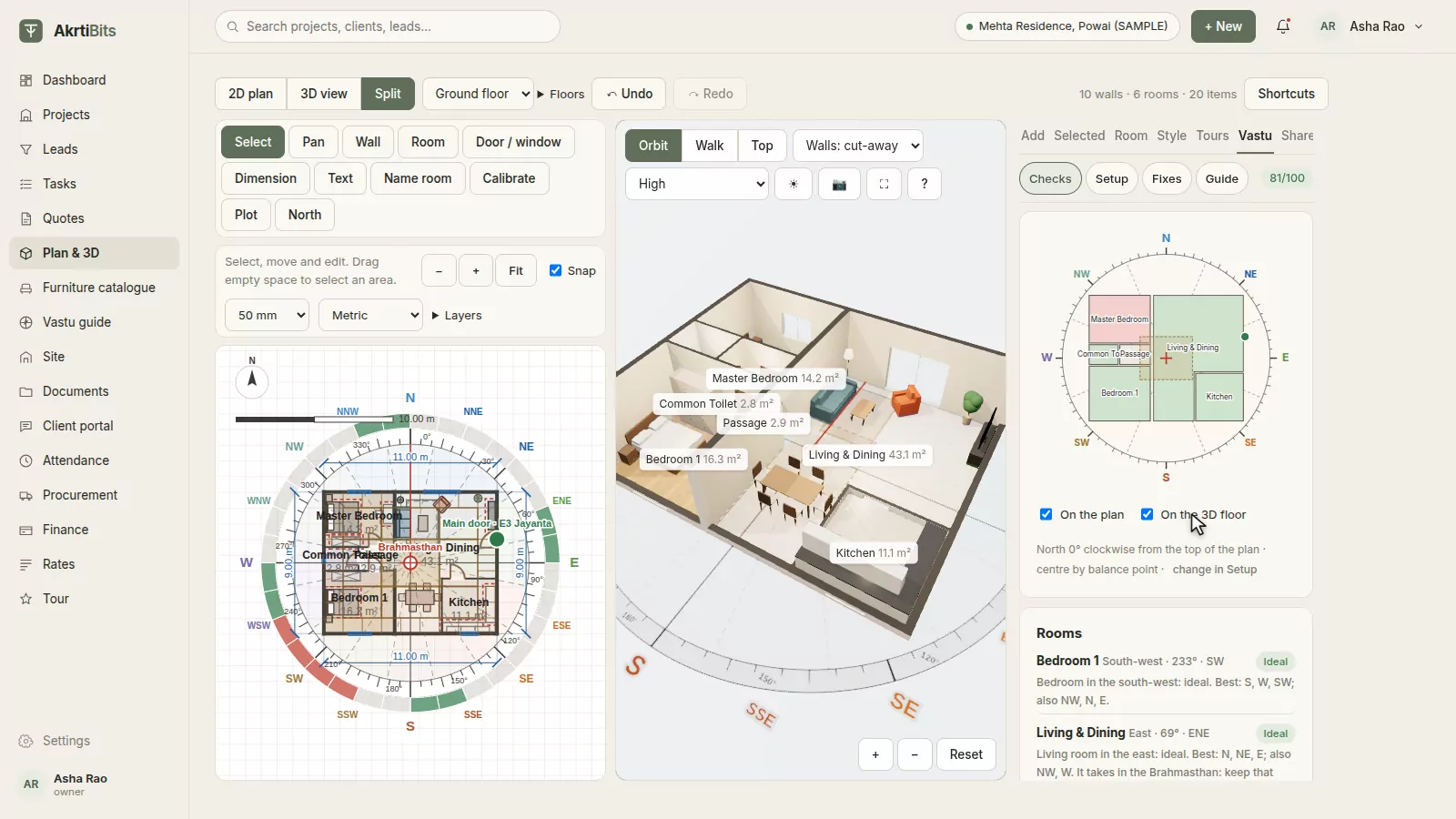
Find the centre of the plan, lay the 360° compass on it, and see every room, door, bed, hob and mandir judged against traditional placements, with the reason for each. Draw the plot and its roads, place the tanks and the gate, and get corrections when something is off.

  • 16 zones and 32 entrance padas
  • 45-deity Vastu Purusha Mandala
  • Plot, roads and site features
  • Corrections with distances
The Vastu compass over the plan with room checks
07 · Reports & sharing

Share it, beautifully.

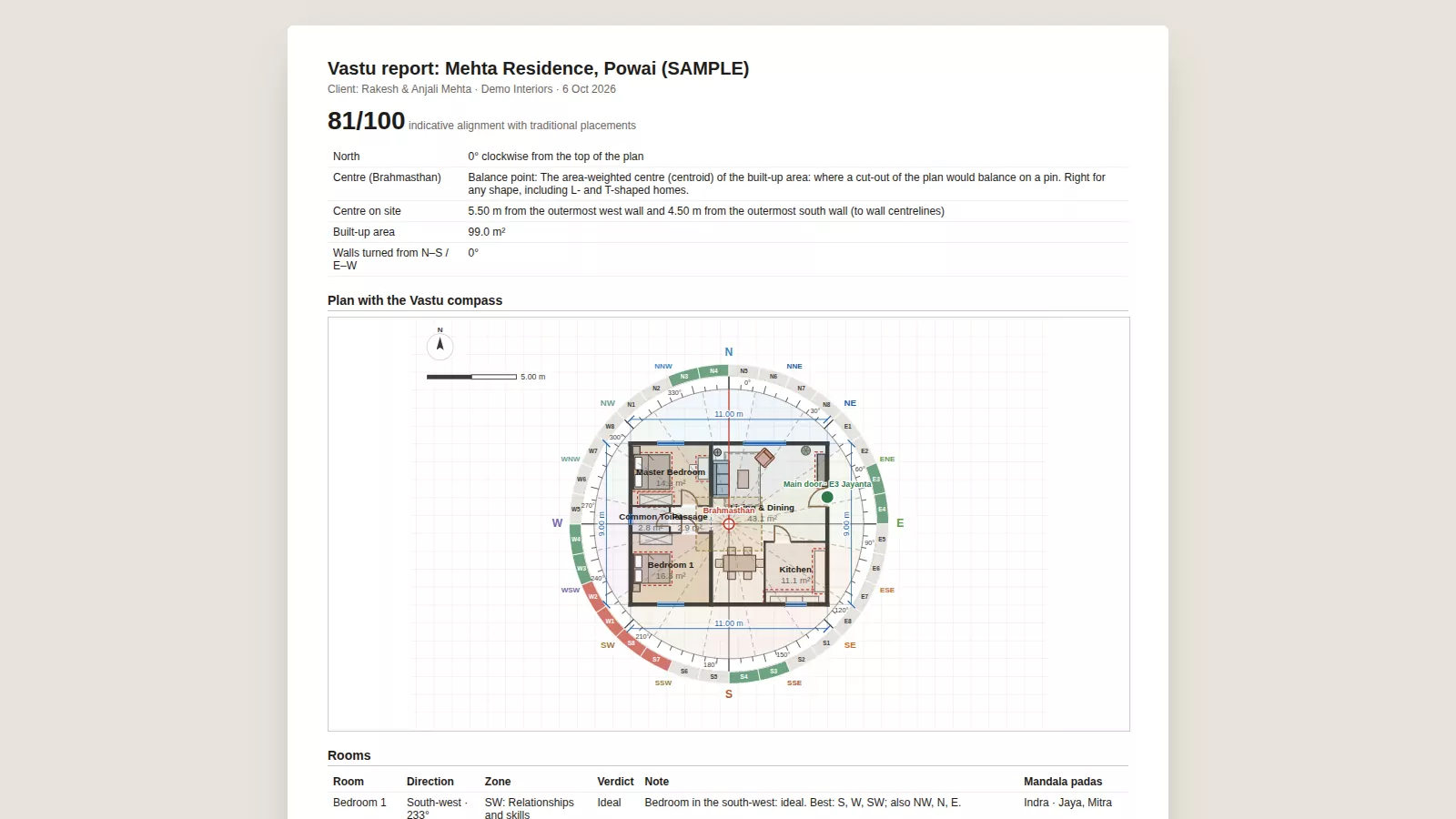
Print the Vastu report and the A3 plan, export DXF for the architect, and send the client a 3D link they open on WhatsApp, with no app and no login.

  • Vastu report (PDF)
  • A3 plan with a title block
  • DXF for AutoCAD
  • Client 3D link on WhatsApp
A printed Vastu report with the plan and the compass
Vastu Shastra

The Vastu conversation, settled at the design stage.

Most clients ask whether a layout is Vastu-compliant before they sign. AkrtiBits finds the centre of the plan, lays the compass on it and explains every verdict, so you can answer with the plan open.

16zones of 22.5°
32entrance padas
45mandala deities
360°compass
  • Centre by balance point, diagonals or by hand, marked for the site
  • Rooms, doors, beds, hob, mandir, safe and mirrors checked
  • Plot facing, roads, shape, open space and slope
  • Tanks, borewell, septic tank, gate, trees and parking
  • Heights across floors, corrections and wall colours
Read the Vastu guide Guidance for discussion with your client, following widely agreed traditional placements.
NNEESESSWWNW
Run the studio

The business side, in the same place.

Leads, people, purchasing, site work and money, connected to the same projects your designers work on.

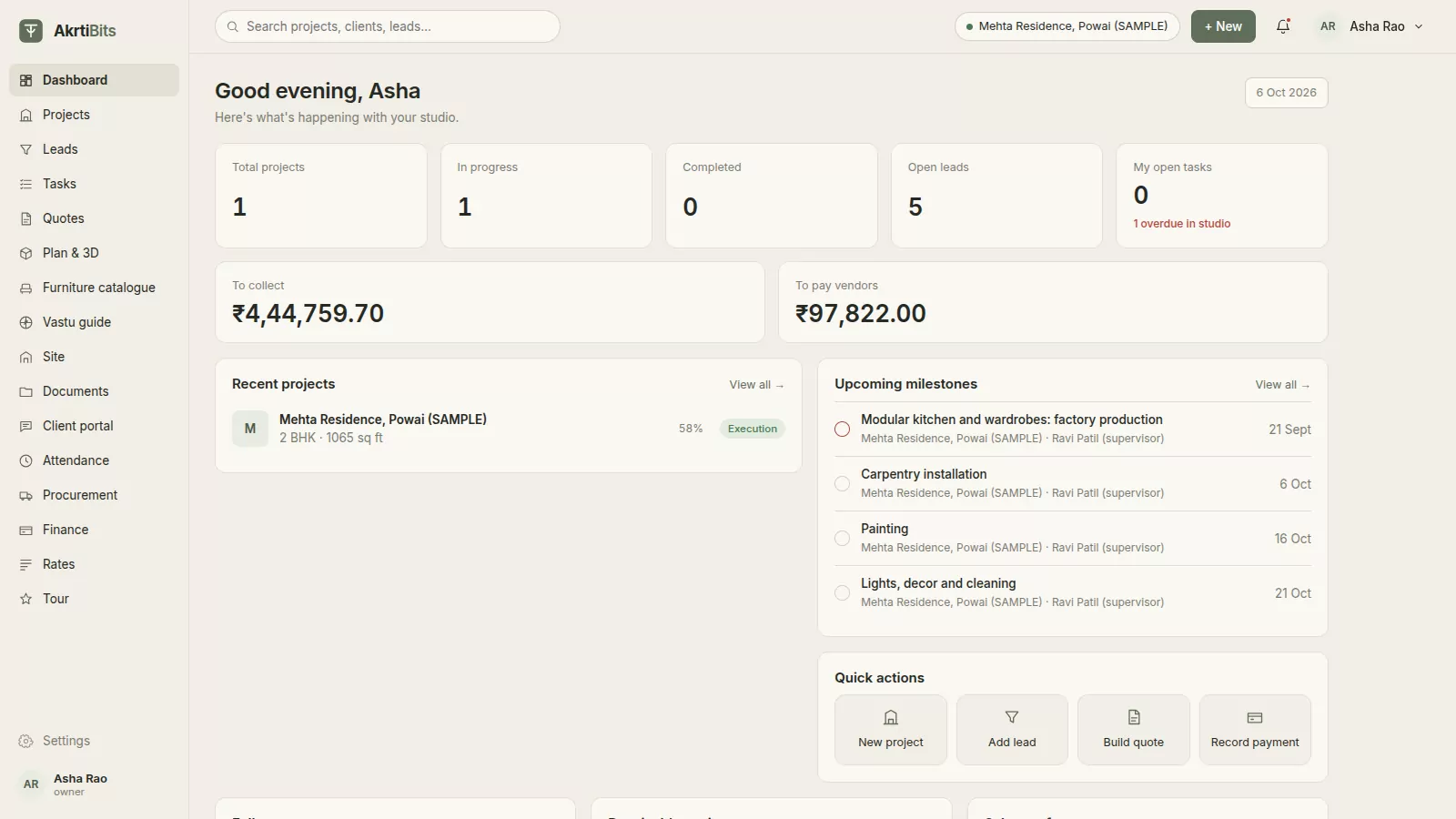
Your studio at a glance

Follow-ups due, money to collect and to pay, project progress, upcoming milestones, low stock and warranties.

The studio dashboard

Leads

Every enquiry on one board, from new to won, with follow-ups, calls, WhatsApp and meetings logged, and a public lead form for your website.

Leads

Tasks and milestones

Start a project from a template and get dated tasks grouped into milestones, with progress for each.

Tasks and milestones

Site and snags

Payments against milestones, a site diary, change orders and snag lists for every project.

Site and snags
Pro

Procurement

Material requests, supplier quotes compared side by side, purchase orders with GST, and goods received.

Procurement

Finance

Receipts, expenses and project P&L; invoices per milestone and receivables ageing on Pro; accounts payable on Enterprise.

Finance

Attendance

Check-in with location, leave requests, and daily labour for costing on Pro.

Attendance
Pro

Inventory and warranty

Stock in from deliveries and out to sites, with low stock and expiring warranties flagged.

Client portal

One link for the client: project stage, quote, invoices and payments, shared documents, snags and chat.

Roles for the whole team

Owner, designer, sales, site supervisor, procurement and accounts, each seeing what their role allows.

One thread

From enquiry to handover, nothing falls between tools.

  1. 01
    EnquiryLead board and public form
  2. 02
    Site visitCheck-ins and notes
  3. 03
    DesignPlan, 3D and Vastu
  4. 04
    QuoteGST quote and client link
  5. 05
    ApprovalClient approves online
  6. 06
    ProcureRequests, bids and POs
  7. 07
    BuildTasks, site diary and snags
  8. 08
    HandoverInvoices, payments and P&L
Rupees and GST, split by state
Millimetres or feet-inches
8 × 4 boards and Indian carpentry
Vastu Shastra built in
Links that open on WhatsApp
Client approvals on any phone
Pricing

Simple per-user pricing.

Per user per year, before GST. Unlimited leads and projects on every plan.

Growth

₹6,000 / user / year

From one user · 10 GB storage · Email support

Everything to design, quote and deliver

  • Plan & 3D, furniture estimates and Vastu
  • Room-wise GST quotes with client approval
  • Leads board and public lead form
  • Tasks, documents and snags
  • Attendance, expenses and project P&L
  • Client portal with chat
Create your studio

Pro

₹11,000 / user / year

From one user · 50 GB storage · WhatsApp support

Everything in Growth, plus

  • Invoices and receivables
  • Measurement sheet
  • Procurement: requests, bids, POs and deliveries
  • Inventory
  • Daily labour attendance
  • Warranty tracking
  • Lead API
  • Pin-point design comments
Create your studio

Enterprise

₹12,500 / user / year

Minimum 10 users · 250 GB storage · Call and WhatsApp support

Everything in Pro, plus

  • Accounts payable
  • Webhooks
  • Company-branded client portal
  • Accounting export
Create your studio

Compare every feature →

Questions

Good to know.

Do I need to install anything?

No. AkrtiBits runs in the browser on a laptop or desktop. Clients open their quote and 3D links on any phone, without an account.

Can I start from my architect's drawing?

Yes. Import an AutoCAD DXF, or upload a photo or scan of the plan, set its scale from one known length and trace over it, or let AI draft the walls, doors and windows for you to correct.

How accurate are the material estimates?

Quantities come from standard Indian carpentry practice (18 mm carcass, 6 mm backs, laminate and liner, edge band, hardware) and the parts are nested onto 8 × 4 sheets, priced at your own rates. Treat them as a strong starting point your carpenter confirms.

Does it handle GST?

Yes. Quotes, purchase orders and invoices split CGST and SGST, or IGST, from your studio's state and the site's or supplier's.

Is the Vastu check a certificate?

No. It follows widely agreed traditional placements and explains every verdict, so you can discuss the layout with your client. Texts and consultants differ on the details; the Vastu guide explains the method.

Can my whole team use it?

Yes, with roles for the owner, designers, sales, site supervisors, procurement and accounts. Each person sees what their role allows.

What does it cost?

Plans start at ₹6,000 per user per year, before GST. Plan & 3D, furniture estimates, Vastu and GST quotes are in every plan.

Bring your next project into AkrtiBits.

Draw it, show it in 3D, price it, check its Vastu and send the quote, all before the client meeting ends.